DashForge Bridge
DashForge Bridge is the Windows companion for games that expose telemetry through Windows shared memory. It forwards raw game data to DashForge and can receive game-control commands from dashboards or hardware.
When You Need It
Use the Bridge for:
- Assetto Corsa
- Assetto Corsa Competizione
- triggering keyboard, Win32 key, or mouse inputs on the Windows gaming PC
F1 24, F1 25, and Forza can send UDP telemetry directly and do not require the Bridge for telemetry.
Portable Installation
The recommended release is a single self-contained file:
DashForgeBridgePortable-1.1.0-win-x64.exe
It includes the .NET runtime. Copy it to the Windows PC and launch it directly; no installer is required.
If Windows Firewall asks, allow access on private networks.
Download the portable executable from Downloads and Companion Tools.
Windows Installer
DashForge Bridge can also be distributed as a Windows installer:
DashForgeBridgeSetup-1.1.0-win-x64.exe
Use the installer when you want Start Menu shortcuts, an optional desktop shortcut, and an optional administrator shortcut.
Download the installer from Downloads and Companion Tools.
Default install location:
%LOCALAPPDATA%\Programs\DashForge Bridge
The installer creates:
| Shortcut | Purpose |
|---|---|
DashForge Bridge | Launches the normal Windows UI. |
DashForge Bridge - Command Listener Only | Starts the Bridge in command-listener-only mode on port 8765. |
DashForge Bridge - Admin | Optional shortcut for games running as administrator. |
If your game runs as administrator and commands do nothing, use the admin shortcut. Windows blocks lower-privilege apps from injecting input into elevated processes.
Forward Telemetry
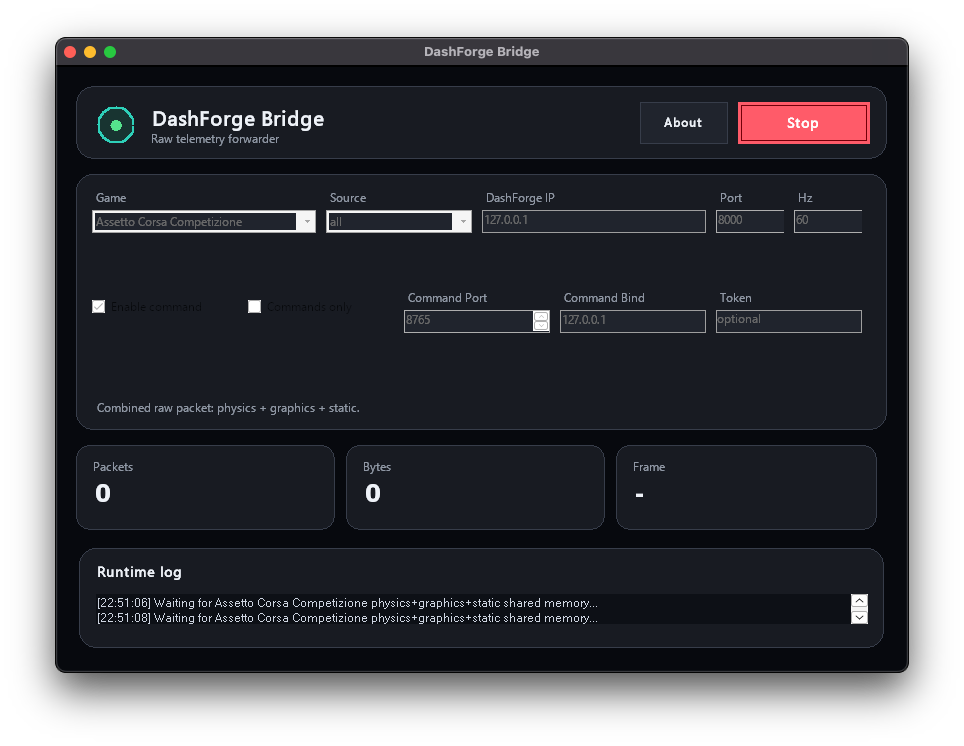
- Launch
DashForgeBridge.exeon the Windows gaming PC. - Select
Assetto CorsaorAssetto Corsa Competizione. - Keep source
allunless diagnosing an individual shared-memory page. - Enter the IP address of the Mac, iPhone, or iPad running DashForge.
- Keep telemetry port
8000unless DashForge uses another listener port. - Choose a rate, normally
60 Hz. - Start the Bridge.
- Select the matching game profile in DashForge.
Source all concatenates pages in this order:
| Game | Pages | Payload |
|---|---|---|
| Assetto Corsa | physics + graphics + static | 1688 bytes |
| Assetto Corsa Competizione | physics + graphics + static | 3172 bytes |
DashForge parses the raw payload. The Bridge deliberately does not reinterpret telemetry.
Command Listener
Telemetry and commands use separate ports:
| Direction | Default port | Format |
|---|---|---|
| Bridge to DashForge telemetry | 8000 | raw binary UDP |
| DashForge/hardware to Bridge commands | 8765 | JSON UDP |
Enable Command listener in the Bridge and keep port 8765 unless another service already uses it.
In DashForge, add an Action Button widget and choose Bridge Command.
Input Types
| Input | Example code | Result |
|---|---|---|
| Keyboard | F8, Space, Left, A | named keyboard key |
| Win32 | 0x70, 112, F1 | Windows virtual-key value |
| Mouse | LeftButton, RightButton, MiddleButton | mouse button |
| Gamepad | n/a | protocol-reserved; no virtual controller is created |
Modes are tap, down, and up. A tap presses the input for the configured duration and releases it. Use down and up only when separate controls must hold and release an input.
For command examples and hardware input routing, see Game Control and Hardware Overview.
Hardware Commands
A microcontroller can send the same UTF-8 JSON packet directly to the Bridge:
{
  "v": 1,
  "type": "command",
  "id": "2bd27705-cd33-45ed-a3ef-40495671c846",
  "source": "hardware",
  "profile": "f1-25",
  "profileName": "F1 25",
  "createdAtMs": 1790000000000,
  "input": {
    "kind": "keyboard",
    "code": "F8",
    "mode": "tap",
    "durationMs": 80
  }
}
Send one command per UDP packet and use a unique id for each action.
Command-Line Mode
.\DashForgeBridge.exe --cli --game assetto-corsa --source all --host 192.168.1.40 --port 8000 --rate 60
ACC example:
.\DashForgeBridge.exe --cli --game acc --host 192.168.1.40 --port 8000 --commands on --command-port 8765
Troubleshooting
No telemetry
- Start the game before or after the Bridge, then press Start again if needed.
- Select the exact game profile in DashForge.
- Verify the DashForge device IP and telemetry port.
- Allow both apps through their local firewalls.
- Use source
all.
Commands do nothing
- Enable the Bridge command listener.
- Use command port
8765, not telemetry port8000. - Focus the game window.
- Run the Bridge as administrator if the game runs as administrator.
- Start with
Keyboard; useWin32only when the game needs a raw virtual-key behavior.
Gamepad input
The protocol accepts gamepad, but the Bridge does not install or emulate a virtual gamepad. Windows requires a virtual HID/driver layer for that behavior. Use keyboard/Win32/mouse commands or external USB HID hardware.