Tutorial: Nobsound + Douk Audio BS-1 50W
This tutorial explains a simple DashForge tactile setup using a Nobsound USB amplifier and one or two Douk Audio BS-1 50W bass shakers mounted on a sim rig, seat, pedal plate, or frame.
Use this when you want DashForge to generate low-frequency vibration from telemetry without routing game audio through external tools.
Hardware Used
| Item | Purpose |
|---|---|
| Nobsound USB amplifier | Audio output device driven by DashForge |
| Douk Audio BS-1 50W bass shaker | Converts low-frequency audio into vibration |
| Speaker wire | Connects the shaker to the amplifier output |
| USB cable | Connects the Nobsound to the Mac |
| Optional second Douk Audio BS-1 | Left/right, seat/pedal, or front/rear separation |
Wiring Diagram
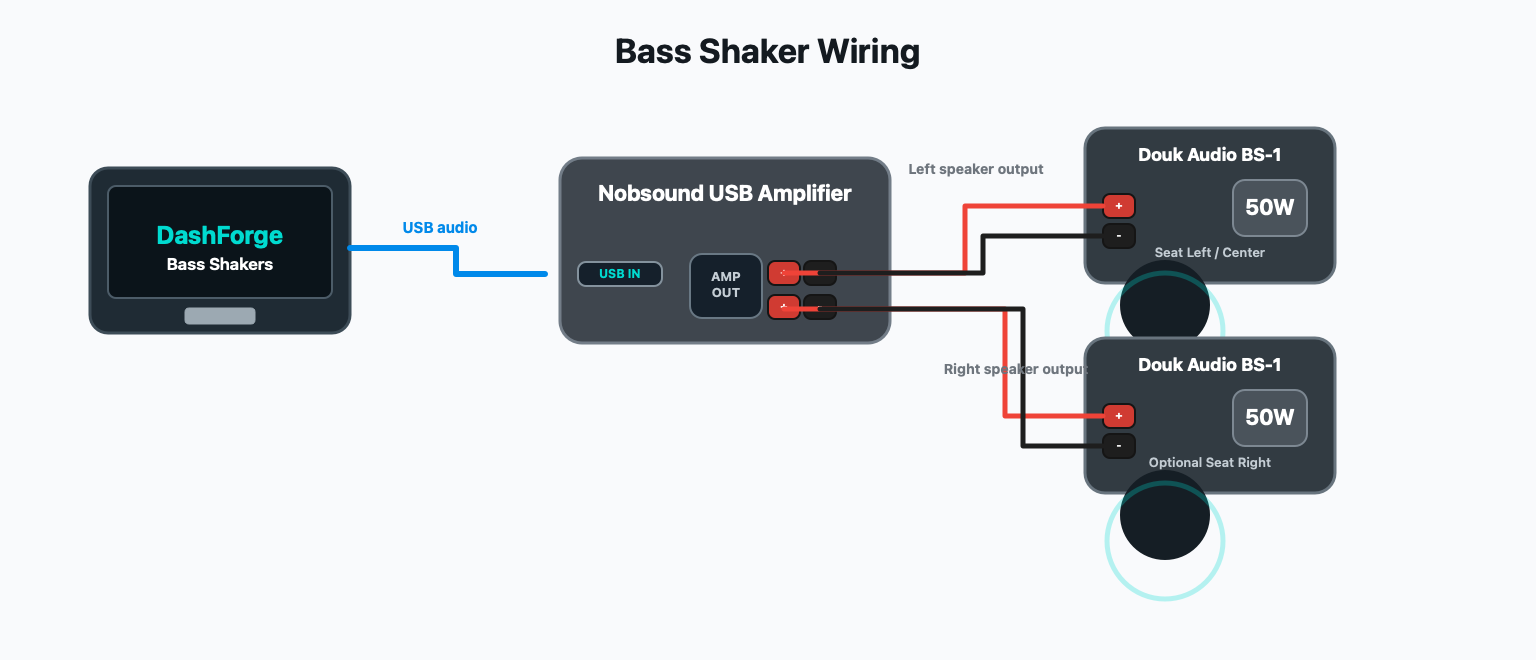
Wiring
- Connect the Nobsound amplifier to the Mac by USB.
- Connect the Douk Audio BS-1 to one speaker output on the Nobsound.
- If using two BS-1 shakers, connect one shaker to the left channel and one to the right channel.
- Keep amplifier volume low for the first test.
- Mount the BS-1 firmly to the seat, pedal plate, or rig frame.
Recommended first layout:
| Shaker | Nobsound output | DashForge position |
|---|---|---|
| Single BS-1 | Left or Right | Seat Center |
| Two BS-1 shakers | Left + Right | Seat Left + Seat Right |
| Seat + pedals | Left + Right | Seat Center + Brake Pedal or Pedals |
macOS Audio Check
- Open macOS
System Settings > Sound. - Confirm that the Nobsound appears as an output device.
- Do not make it your main system output unless you want all Mac audio routed to the shaker amplifier.
- In DashForge, select the Nobsound directly as the Bass Shakers output.
If the device disconnects after changing settings, unplug/replug USB, then click the refresh button in DashForge's Bass Shakers panel.
DashForge Setup
- Open
Settings > Hardware. - Open Bass Shakers.
- Enable Engine.
- Set
Input SourcetoTelemetry. - Set
Default Outputto the Nobsound device. - Add one shaker.
- Set its position to
Seat Center. - Set output mode:
Lfor the left speaker outputRfor the right speaker outputL+R Monowhen one shaker should receive the same signal on both channels
- Start with
Gainaround40-60%. - Keep the physical amplifier volume low until you confirm the BS-1 is not clipping or heating up.
Recommended starting mix:
| Effect | Start |
|---|---|
| Engine RPM | 40% |
| Road | 35% |
| Suspension | 35% |
| Slip | 25% |
| Brake Lock | 15% |
| Gear Shift | 45% |
Two-Shaker Setup
For two shakers on a Nobsound stereo output:
| DashForge shaker | Output mode | Position |
|---|---|---|
| Seat Left | L | Seat Left |
| Seat Right | R | Seat Right |
This lets DashForge send different vibration emphasis depending on position. Rear/seat placements feel more road, engine, suspension, and rear slip. Pedal placements emphasize brake lock and pedal events.
For a single Douk Audio BS-1, L+R Mono is usually the easiest output mode:
DashForge sends the same tactile signal to both stereo channels, and you can use
whichever speaker output is wired to the shaker.
Tuning Order
- Turn Master down first.
- Tune Engine RPM alone.
- Add Road until the car feels alive at speed.
- Add Suspension for bumps and impacts.
- Add Gear Shift for short thumps.
- Add Slip and Brake Lock lightly.
- Increase amplifier volume only after DashForge levels feel controlled.
Good Starting Values
| Setting | Suggested value |
|---|---|
| Master | 50-70% |
| Update | 60-120 Hz |
| RPM Range | 28-92 Hz |
| Idle Cutoff | 800-1000 RPM |
| Per-shaker Gain | 40-70% |
Lower the maximum RPM frequency if the shaker sounds buzzy instead of tactile. Raise the idle cutoff if the shaker keeps rumbling while parked.
The Douk Audio BS-1 is rated for 50W, but tactile output depends heavily on the mounting point. A rigid metal or thick wood mount usually feels stronger and cleaner than a soft or flexible surface.
Test Checklist
- With DashForge idle, the shaker should be silent.
- During replay or live telemetry, engine vibration should follow RPM.
- Gear shift should feel like a short pulse, not a constant buzz.
- Brake lock and slip should be noticeable but not always active.
- Stopping UDP or replay should clear the signal.
Troubleshooting
| Problem | Fix |
|---|---|
| No vibration | Check Nobsound output selection, USB connection, amplifier volume, and shaker wiring. |
| Constant vibration at idle | Raise Idle Cutoff, lower Engine RPM mix, or lower Master. |
| Shaker disconnects | Replug USB, refresh outputs, avoid changing system sample rate while DashForge is running. |
| Sound is too harsh | Lower RPM max frequency and reduce Engine/Road mix. |
| Left/right feels swapped | Swap output mode in DashForge or swap speaker wires. |
Safety Notes For The Douk Audio BS-1
- Start with low DashForge Master and low amplifier volume.
- Avoid long full-power sine-like vibration while parked.
- If the BS-1 or amplifier gets hot, reduce gain and physical volume.
- Secure the shaker firmly before driving; loose mounting can sound louder but feel weaker.
- Stop DashForge output before changing speaker wiring.